Jujutsu (jj) GUI
Ukemi
A visual interface for Jujutsu (jj) in VS Code.
In judo, ukemi is the art of falling safely. With jj and undo, every change is safe to try.
Features
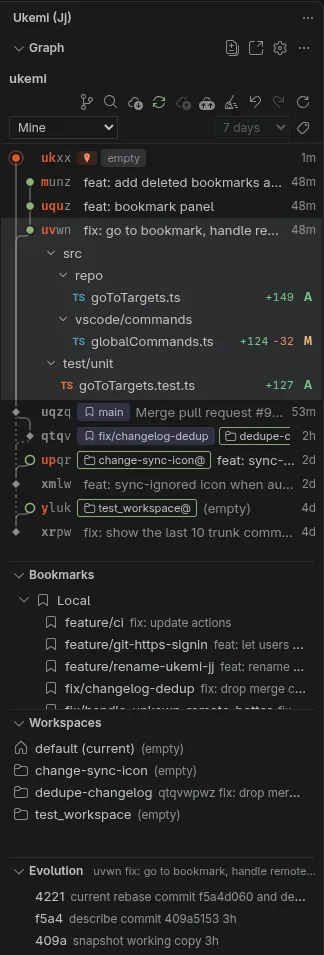
Change graph
See changes, bookmarks, tags, workspaces and conflicts. The working copy has a red seal. Filter by Recent, Mine, My history, Stack or Working copy.
Drag and drop
Drag a change onto another to rebase it with its descendants. Hold Alt to move only that change, or Ctrl to duplicate it. Drag a file or a bookmark to move it.
Edit history
Describe, squash, split, abandon, duplicate and revert from the change. Rebase onto the trunk, or ship that change to the trunk and push it.
Bookmarks and workspaces
Open, rename, track and push bookmarks, or start a pull or merge request. Open a workspace in this window or a new one.
Evolution and diffs
Follow each amend, describe, snapshot and rebase of the selected change. Open a file diff, or restore the files from an earlier version.
Pull and merge requests
Create a GitHub pull request or a GitLab merge request from a change. Status and CI show in the graph. Merge, then clean up.
No setup
When jj is missing, Ukemi downloads the official static release and checks its SHA-256 digest. That binary can be added to PATH in integrated terminals.
Requirements
Linux, tested on Ubuntu 24.04 and Fedora 41. jj 0.40 or later. Ukemi downloads jj 0.46 when you agree.